PulsePoint Respond
- 4.6
- Rating
- 1.00M
- Installs
- Free
- Price
 Analysis by App-foxy
I look at PulsePoint Respond as a medical app with a very specific purpose: helping people who already know CPR respond when a nearby cardiac emergency is reported. That focus makes it quite different from a general first-aid reference or a wellness tracker. It is not something I open for casual browsing. Its value appears in a tense, time-sensitive situation where awareness, distance, and a willingness to help all matter at once.
After spending time with it, my main impression is that the app is built around connectivity. It becomes useful when an alert can reach the right people quickly, when the phone can present enough location context to make a decision, and when the user can act without getting distracted. That also creates its biggest limitation: an alert-based service is only as helpful as the network, local coverage, device settings, and nearby responder community allow.
How PulsePoint Respond fits into real emergency response
PulsePoint Foundation developed this free medical app for everyone, and its central message is practical rather than theoretical: if I have CPR skills and am close enough to a reported cardiac emergency, I may be able to help before professional responders arrive. The app has been available since December 2011, and its presence on more than one million devices suggests that the idea has reached a substantial audience.
You May Also Like

 Blood Strike: 2.5 Anniversary
Blood Strike’s Loadouts Turn Every Drop Into a Tactical Gamble
A close look at Blood Strike’s custom loadouts: how fast access to signature weapons reshapes its battle royale rhythm, rewards preparation, and narrows the gap between fights.

 Pandora - Music & Podcasts
Pandora’s Music Is Easy to Start, but Harder to Recover
Pandora’s strength is its low-effort path from a seed to a station. Its weak spot is how much confidence it asks you to place in connection, setup, and quiet recovery.

 8 Ball Pool
 Is Built on Rivalries, Rematches, and Routine
A close look at the rivalries, rematches, shared routines, and unanswered safety questions that turn a quick pool match into a persistent mobile community.

 Samsung Music
’s Quiet Strength Is Playing What You Already Own
Its reach comes less from spectacle than from dependable access to a personal library. That simplicity is both the app’s strongest retention engine and its ceiling.

 AccuWeather: Weather Radar
AccuWeather Review: A Quick, Clear Forecast for Everyday Decisions
For everyday plans, the best forecast is the one you can understand quickly. AccuWeather makes rain timing, radar, and local conditions easy to act on, with a few trade-offs.

 Hill Climb Racing
Why Hill Climb Racing Still Turns Crashes Into One More Run
A tiny car, a bumpy hill and one more upgrade: Hill Climb Racing keeps resurfacing because its simple chaos makes every near-miss feel personal.
More From Our News Desk
View All News


That does not mean every person who installs it should rush toward every alert. The responsible use of an app like this starts with knowing my own training, following emergency instructions, and keeping personal safety ahead of curiosity. In my view, the app works best as a bridge between awareness and action, not as a replacement for emergency services, formal CPR instruction, or professional medical care.
The distinction matters because the app is not primarily teaching me how to perform CPR from the beginning. Someone who has never learned the technique may find the concept appealing but still lack the confidence and practical skill needed in a real crisis. I would recommend taking a recognized CPR course first, then using PulsePoint as a way to stay alert to opportunities where that training might help.
The application has earned a 4.6 average from around 33 thousand ratings, with roughly 11 thousand written reviews. Those figures indicate strong user approval, but they should not be mistaken for a promise that alerts will appear in every location or that every notification will lead to a situation where assistance is appropriate. Local availability and the quality of the connected emergency response system remain central to the experience.
Why the network changes the experience
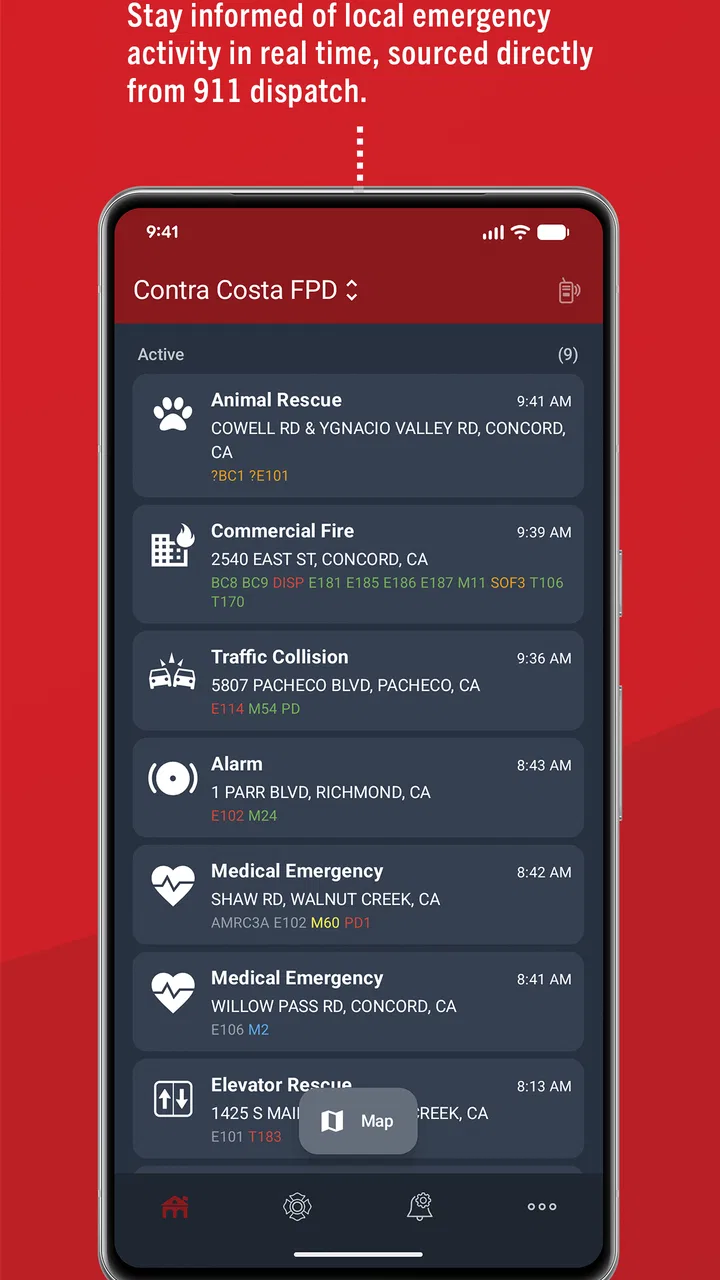
Unlike a static first-aid guide, PulsePoint Respond depends on information moving through a connected system. An alert has to be generated, transmitted, displayed, and understood quickly. If my phone has weak connectivity, if notifications are delayed, or if I am in an area with limited local participation, the app may provide much less practical value than its purpose suggests.
This is the first trade-off I would explain to a friend. The app can make me aware of an emergency I might otherwise never know about, but it cannot create a response opportunity where no connected alert exists. A strong internet connection in a place without relevant coverage is not enough, and excellent local coverage cannot help if my phone is unable to receive or present the notification properly.
For that reason, I would not judge the app by opening it once at home and deciding whether it feels active. Its usefulness is tied to place and circumstance. A person living or working in an area with an established PulsePoint presence may experience a meaningful stream of relevant alerts, while someone elsewhere may rarely see anything. That difference is not necessarily a flaw in the interface; it is a consequence of how community-based emergency information works.
There is also an emotional side to network dependence. A notification about a cardiac emergency is not ordinary app activity. It can interrupt a meal, a commute, or a quiet evening. I appreciate the seriousness of that design goal, but I also think users should decide in advance how they will react. A notification should prompt a calm assessment, not an impulsive attempt to enter an unsafe scene or interfere with trained responders.
Using it while moving through everyday places
The most realistic scenario for me is not sitting at a desk with the app open. It is carrying a phone while walking through a neighborhood, waiting in a public building, or traveling to work. In those situations, the phone’s connection and notification behavior matter more than the visual polish of the app. I need to notice an alert, understand whether I am plausibly close enough to help, and decide quickly whether responding is safe and appropriate.
That makes the app particularly suited to people whose routines take them through populated areas. A person who spends much of the day near public spaces may have more opportunities to be useful than someone who works in an isolated location. CPR instructors, community volunteers, healthcare-minded residents, and people who regularly refresh their training are natural candidates.
At the same time, I would not install it simply to feel like I am participating in emergency response. The app cannot turn an untrained bystander into a rescuer. It also cannot guarantee that I will be physically able to reach an incident, that I will have the right equipment, or that the situation will remain appropriate for a civilian response by the time I arrive.
Mobile use introduces small but important practical issues. My phone may be in a pocket, on silent, low on battery, or connected through an unreliable signal. I might be driving, caring for a child, or in a meeting when an alert arrives. Those are not reasons to blame the app; they are reasons to be realistic about whether I can respond. I would rather treat the notification as an invitation to assess than as an obligation to abandon whatever I am doing.
One useful habit is to review my phone’s notification behavior after installing the app rather than assuming every alert will be presented in the way I expect. I would also think about whether location-related prompts, sound settings, and battery-saving behavior could affect how quickly I notice an alert. I am not claiming a particular setting is required; the practical lesson is simply to understand how my own phone handles urgent notifications.
What happens when connectivity or attention fails
Every connected emergency tool has failure points. The network may be unavailable, the phone may be offline, the notification may be missed, or the user may be too far away to make a useful difference. A mature review of PulsePoint Respond has to include those possibilities because the stakes are higher than with an ordinary social or productivity app.
I would never make it my only source of emergency guidance. If I witness a cardiac emergency, the priority is to contact emergency services and follow the instructions of the dispatcher. The app can add awareness, but it should not delay a call, replace professional direction, or encourage me to act beyond my training. This is one of the clearest situations where another option is better: direct emergency communication is the essential route when I am physically present at the incident.
Recovery after a missed or interrupted alert is also important. If I notice an alert late, I should not try to reconstruct the situation by guessing or rushing without context. I would check what the app is showing, consider whether the event is still relevant, and defer to emergency personnel if they are already handling it. A delayed response can create confusion, especially if several people arrive without coordination.
There is a less obvious recovery issue as well: emotional recovery. Seeing repeated emergency notifications may be stressful, particularly for people who have experienced a serious medical event. I think users should pay attention to how the alert stream affects them. If the app causes anxiety without leading to realistic opportunities to help, taking a break or changing how it fits into daily life may be sensible. A medical tool should support responsible action, not produce constant guilt.
Another practical tip is to keep CPR knowledge current instead of treating installation as the final step. The app’s purpose makes more sense when paired with confidence in basic response skills. If I cannot remember what to do, the right answer is training and emergency-dispatch guidance, not improvisation based on a notification.
Keeping mobile data and attention under control
Because the app is connected to timely information, I would expect it to require some communication with online services for its alert experience. That means people with strict data limits should be thoughtful about how they use it. I would monitor my phone’s normal data controls and battery behavior rather than assuming every network-dependent app has the same impact on a particular device.
I would also avoid opening the app repeatedly just to see whether anything has changed. If the service is designed to notify me, constant manual checking may add little value while increasing distraction. A better approach is to decide when I am genuinely available to respond and to keep my phone configured in a way that lets me notice relevant alerts without turning every moment into emergency watch duty.
This is where PulsePoint differs from a downloadable CPR card or a conventional first-aid app. A reference guide can be useful when I have no connection, provided its content is already on the device. PulsePoint’s distinctive benefit is timely awareness of a nearby reported event, so connectivity is part of the product’s identity rather than a minor convenience. If my priority is offline education, a dedicated first-aid reference may be the better companion.
On the other hand, a map-only emergency app would not offer the same kind of community response purpose, and a general health app would usually be aimed at personal monitoring rather than immediate bystander action. PulsePoint occupies a narrower space. That narrowness is a strength for trained users who want this specific kind of alert, but it also means the app may feel unnecessary to someone seeking broad medical information.
Who should install it, and who should skip it?
I would recommend trying PulsePoint Respond if I had CPR training, lived or worked in an area where its emergency alerts are relevant, and was comfortable making a calm decision in a stressful situation. It is especially compelling for people who want their everyday movement through the community to include a chance of helping someone nearby.
I would be more cautious about recommending it to someone who expects guaranteed alerts, instant instructions for every medical emergency, or a substitute for learning CPR. It is also not the right fit for a person who cannot safely respond to notifications because of work, driving, health, caregiving responsibilities, or personal boundaries. Installing a response-oriented app does not create a duty to put oneself at risk.
The age rating of Everyone makes it broadly accessible, but accessibility should not be confused with readiness. A younger or inexperienced user may be able to install the app while still needing adult guidance and proper training before considering any response. The most responsible user is not necessarily the one who reacts fastest; it is the one who knows when to help, when to call, and when to stay clear.
The current version is 4.27, and the app’s long history gives it the feel of a focused service rather than a temporary experiment. Still, I would keep expectations grounded. Version updates can improve an app, but they cannot solve every local coverage issue or guarantee that a phone will always have a usable connection. The quality of the experience remains partly outside the app itself.
My verdict on a connectivity-first emergency app
PulsePoint Respond is a focused tool with a serious purpose. I like that it connects CPR-trained people with the possibility of helping nearby instead of presenting itself as a broad medical encyclopedia. Its free price removes a common barrier, and the fact that it is used on over one million devices makes it easy to understand why many people are curious about the idea.
My recommendation comes with a clear condition: install it alongside CPR training, emergency-service guidance, and realistic expectations about connectivity. The strongest use case is a trained person in a supported area who keeps a functioning phone nearby and can evaluate an alert without taking unnecessary risks. The weakest use case is someone looking for offline medical education or guaranteed coverage wherever they travel.
In daily life, the app’s success is measured less by how often I open it than by whether it can quietly connect the right information to the right person at the right moment. That is a powerful goal, but it depends on networks, local participation, phone behavior, and human judgment. The best way to use PulsePoint Respond is as an extra layer of awareness, never as the only layer of emergency preparation.
FAQs for PulsePoint Respond
01What is PulsePoint Respond and how does it work?
PulsePoint Respond is a mobile app designed to alert CPR-trained citizens of emergencies in their vicinity, empowering them to provide life-saving assistance before professional help arrives. It integrates with local emergency services to dispatch notifications about nearby incidents requiring CPR, such as cardiac arrests, and shows the location of the nearest automated external defibrillator (AED).
02Is PulsePoint Respond free to download and use?
Yes, PulsePoint Respond is free to download and use on both Android and iOS devices. It aims to increase community engagement in first-response efforts by providing critical information without any cost to users. However, it requires a community's emergency services to integrate with its system for full functionality.
03What are the device requirements for PulsePoint Respond?
PulsePoint Respond is compatible with most modern smartphones running Android or iOS. Users should ensure their devices have GPS capabilities and a stable internet connection to receive real-time alerts and updates. It's advisable to check the app's page on Google Play or the App Store for specific version requirements.
04How does PulsePoint Respond ensure user privacy and data security?
PulsePoint Respond prioritizes user privacy by not collecting or storing personal data beyond what is necessary for functionality. The app uses location services solely to alert users about emergencies nearby. It does not track user movements continuously and adheres to strict data protection regulations.
05Can anyone receive alerts from PulsePoint Respond, or is it only for trained individuals?
While PulsePoint Respond is available to everyone, it is particularly beneficial for individuals trained in CPR and first aid. The app serves as a tool to empower trained bystanders to provide immediate assistance. However, any user can benefit from the awareness of nearby emergencies and AED locations.
Pros
- Real-time emergency alerts.
- Crowdsourced CPR assistance.
- User-friendly interface.
- Community engagement features.
- Customizable notification settings.
Cons
- Limited to participating regions.
- Requires constant location access.
- Battery consumption concerns.
- Dependent on user participation.
- No offline functionality.

PulsePoint Respond
Gallery